 GanttCalc
Free Gantt chart maker
Make a Gantt chart in your browser in a few minutes. Type your tasks like a spreadsheet, link them, and download the chart as a picture for your slides, a PDF or an Excel file. Free, no sign-up, nothing to install.
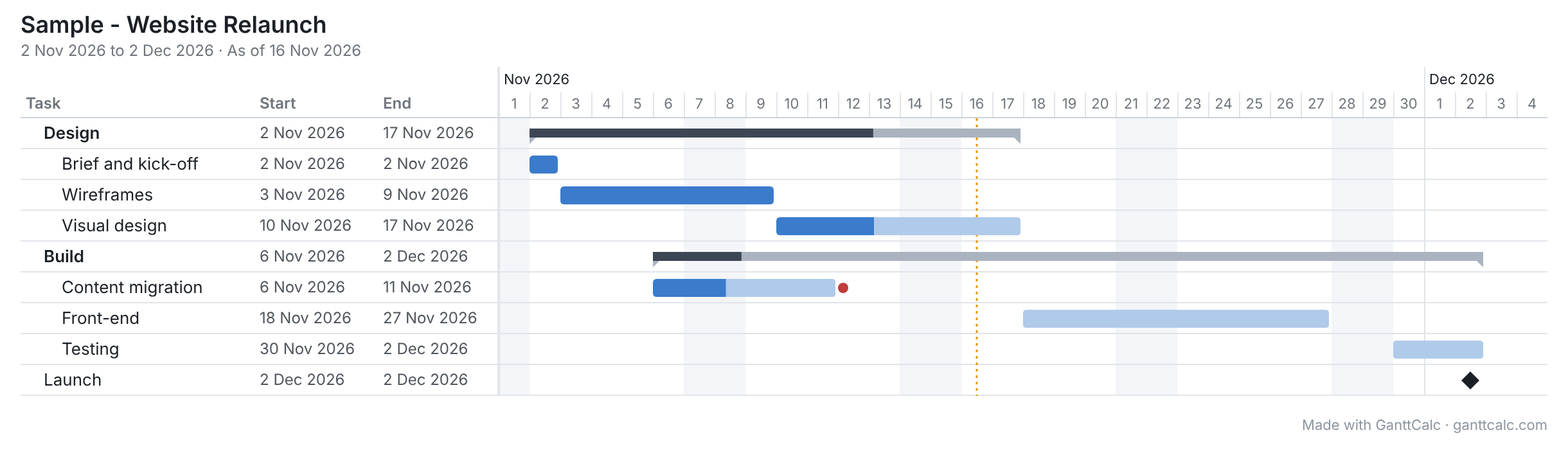
Make a Gantt chart in 3 steps
- Start blank or from a template. Construction, marketing, events, software and more. Or paste your task list straight from Excel.
- Type tasks, dates and durations. Link a task to the one it waits for, and when one runs late, everything after it moves, counting working days only.
- Download your chart. File › Export › PNG picture gives one clean image of the whole timeline, however long. PDF and Excel are there too.
What you get for free
- No sign-up and no download: it runs in any modern browser on Windows, Mac or Linux
- Linked tasks, milestones, groups, holidays and your own working days
- Columns that calculate, like a spreadsheet: cost, hours, days late, anything with a formula
- Export as a PNG picture, a PDF or an Excel file with live formulas
- Save your plan as a file on your computer and open it again any time
- Import a CSV from MS Project and most other Gantt tools
Questions
Is the Gantt chart maker really free?
Yes. Making, saving and exporting a Gantt chart is free, with no sign-up. Pictures and printouts made on Free carry one small grey "Made with GanttCalc" line at the bottom. Pro removes it and adds cloud sync and sharing links.
How do I get my Gantt chart into PowerPoint or Google Slides?
Choose File › Export › PNG picture, then drag the picture onto your slide. It shows the plan as on your screen: the columns showing, and the bars.
Will the picture show my costs or private notes?
Only if they're showing. A picture is made as on your screen: the columns showing, the rows showing and the timeline. To leave costs out, hide the Cost column first, or untick Table in the export so only the bars go in.
My plan runs for years. Will it fit?
Yes. The picture picks a scale that fits the whole timeline: days for short plans, then weeks, months or quarters for long ones.
Do I need Excel?
No. If you have an Excel plan, copy the rows and paste them in. You can export back to Excel at any time.
Prefer to describe your project in words? With Pro, coming soon, the AI Gantt chart maker will draft it for you.